Technitium Letsencrypt with Cloudflare
This document will walk through the steps to setup Letsencrypt with DoH and Cloudflare. This guide assumes you have a working Technitium install, are running on at least Debian 13 and have a properly configured Cloudflare API token.
Install required packages
On a root shell run the following to install the certbot packages needed to use DNS-01 challenges.
apt install certbot python3-certbot-dns-cloudflare -y
Configure certbot
Create script to run on a sucessful certificate deploy that will generate an updated pfx cert for Technitium and restart its service.
mkdir -p /etc/letsencrypt/renewal-hooks/deploy
vim /etc/letsencrypt/renewal-hooks/deploy/pkcs12convert.sh
- Paste the following into the file. Replace
domain.comwith your domain. You can update thepassoutas well. Save that as you'll need to add that to the Technitium interface to use the newly created cert.
#!/usr/bin/env sh

DOMAIN=domain.com

# generate pfx from certs
openssl pkcs12 -export -out /etc/letsencrypt/live/${DOMAIN}/cert.pfx \
        -inkey /etc/letsencrypt/live/${DOMAIN}/privkey.pem \
        -in /etc/letsencrypt/live/${DOMAIN}/cert.pem \
        -certfile /etc/letsencrypt/live/${DOMAIN}/chain.pem \
        -passout pass:changeme

# restart technitium
systemctl restart technitium

echo "pkcs#12 generated!"
- Create a local certbot secret with the Cloudflare API token in it. This should be done as the
rootuser for simplicity.
mkdir -p ~/.secrets/certbot
echo "dns_cloudflare_api_token = YOUR_API_TOKEN" > ~/.secrets/certbot/cloudflare.ini
chmod 600 ~/.secrets/certbot/cloudflare.ini
Request cert
Request cert manually for initial deployment. Replace domain.com with your domain and user@domain.com with the appropriate email address.
certbot certonly --dns-cloudflare \
  --dns-cloudflare-credentials ~/.secrets/certbot/cloudflare.ini \
  -d domain.com \
  -d *.domain.com \
  --agree-tos \
  --email user@domain.com \
  --non-interactive
Configure Technitium
- Configure Cert in Technitium.
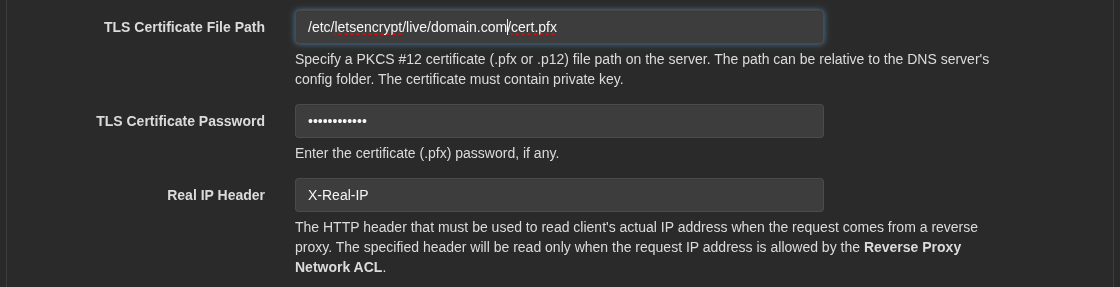
Launch the Technitium management interface then go to Settings -> Optional Protocols, then scroll to the bottom of the page and modify TLS Certificate File Path to the following. Modify domain.com to your domain and enter the password that you used in the script in step 2 in the TLS Certificate Password field. Once you have done that, go ahead and click Save Settings at the bottom of the page.
- Configure DoH, DoT, and DoQ.
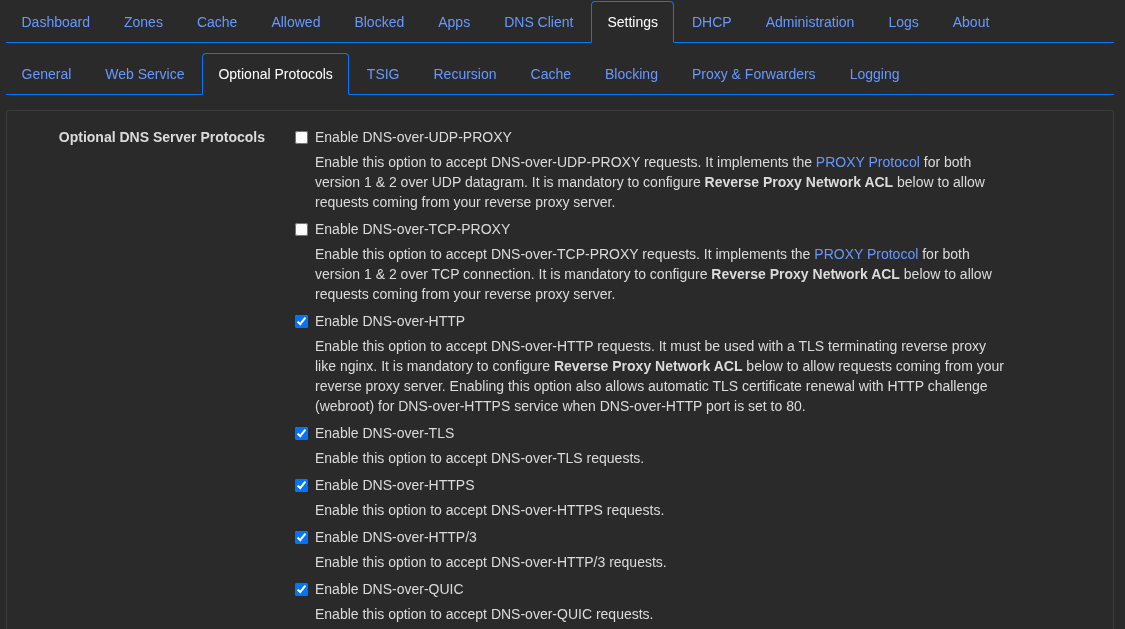
On the same page from step 5, enable the following services to make use of the new cert.
DNS-over-HTTPDNS-over-TLSDNS-over-HTTPSDNS-over-HTTPS/3DNS-over-QUIC
Test new configuration
- Test interface to ensure it's functioning correctly now.
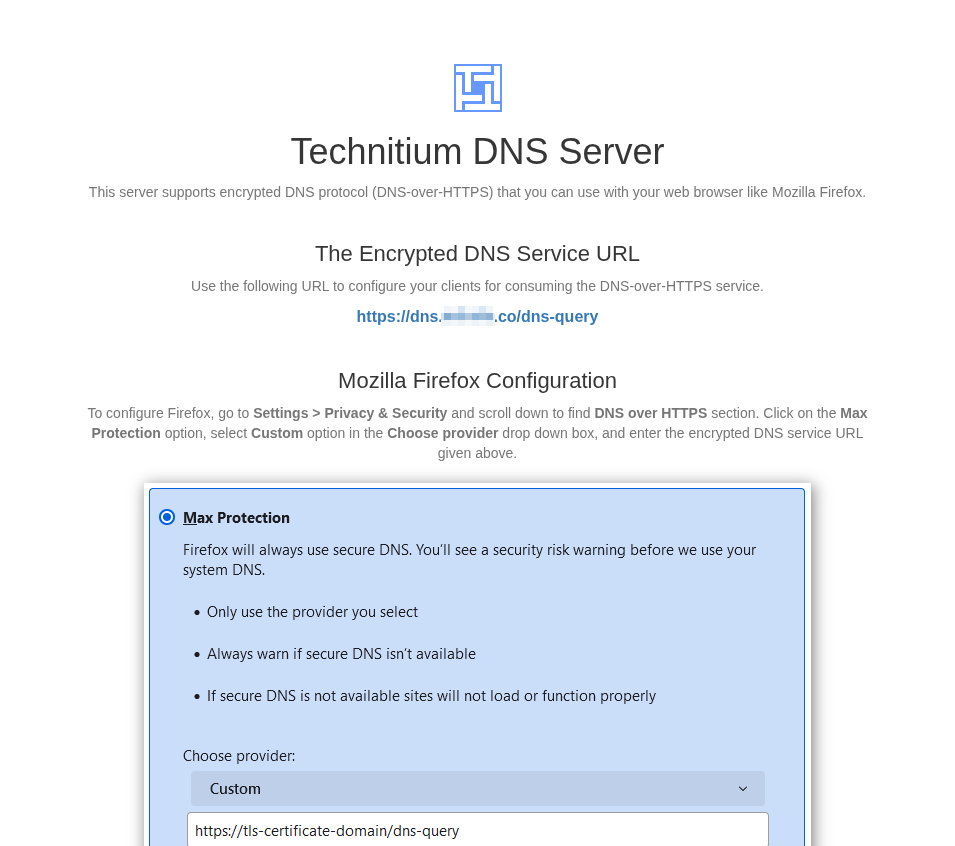
Browse to the url of your Technitium DNS server. You should have something like dns.domain.com setup. Your browser should not show any issues with the site when visiting the URL.

and your informational page should now load showing your users how to congfigure their browser to point to the new secure DNS endpoint.
- Test dns resolution on new protocols.
Use dig to test DoT.
dig @dns.domain.com +tls domain.com|tail -5
In the output the following and we can see a successful query.
;; Query time: 2 msec
;; SERVER: 192.168.0.8#853(dns.domain.com) (TLS)
;; WHEN: Tue Dec 23 18:02:29 EST 2025
;; MSG SIZE  rcvd: 54
Use dig to test DoH.
dig @dns.domain.com +https domain.com|tail -5
In the output the following and we can see a successful query.
;; Query time: 3 msec
;; SERVER: 192.168.0.8#443(dns.domain.com) (HTTPS)
;; WHEN: Tue Dec 23 18:04:20 EST 2025
;; MSG SIZE  rcvd: 54
Certbot timer information
Certbot, when installed on Debian 13, will install a systemd timer that runs certbot renew twice a day. See snippet below.
root@dns:~# systemctl cat certbot.timer
# /usr/lib/systemd/system/certbot.timer
[Unit]
Description=Run certbot twice daily

[Timer]
OnCalendar=*-*-* 00,12:00:00
RandomizedDelaySec=43200
Persistent=true

[Install]
WantedBy=timers.target
Which you can see calls the certbot.service below which runs the ExecStart for the certbot renew command.
root@dns:~# systemctl cat certbot.service
# /usr/lib/systemd/system/certbot.service
[Unit]
Description=Certbot
Documentation=file:///usr/share/doc/python-certbot-doc/html/index.html
Documentation=https://certbot.eff.org/docs
[Service]
Type=oneshot
ExecStart=/usr/bin/certbot -q renew --no-random-sleep-on-renew
PrivateTmp=true